UI & Graphic
UI & Graphic Prompt Template
Use Cases
- Suitable for UI & Graphic AI image generation workflows, with reusable structure for fast iteration.
- Best for product hero shots, packaging proposals, and brand campaign visuals.
Notes
- Replace placeholders (such as
[OBJECT]and{variable}) with concrete subjects and contexts. - Keep core constraints first (composition, lighting, lens, materials), then add style modifiers gradually.
- If results become noisy, reduce prompt density and reintroduce key elements step by step.
#UI & Graphic
作者@AmirMushich来源链接https://x.com/AmirMushich/status/2038319037248114957
Prompt 模板
[BRAND NAME] + [HERO COLOR]

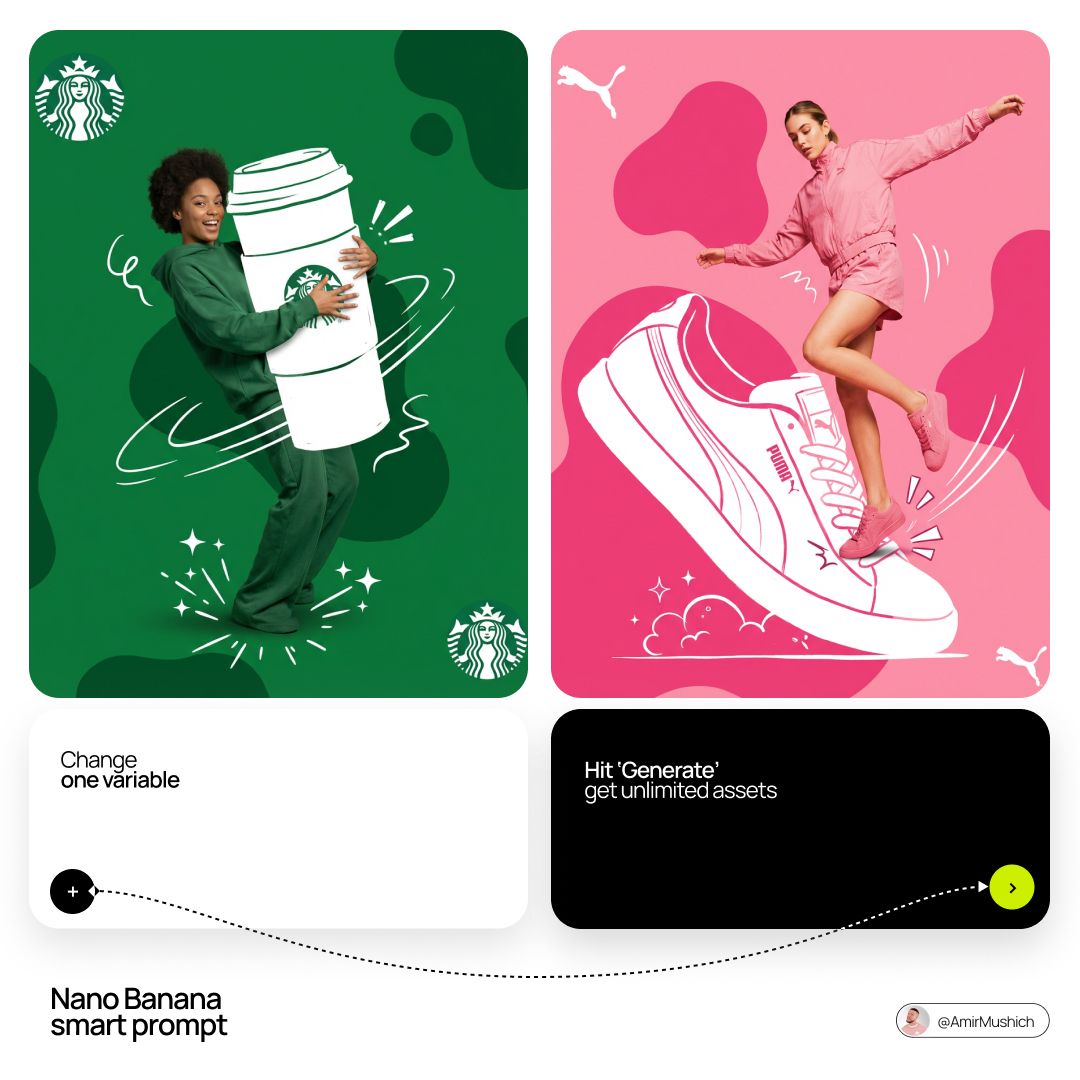
Act as a Mixed-Media Campaign Art Director. Your specialty: combining studio photography cutouts with hand-drawn 2D illustration where the real human and the drawn object physically interact — touching, holding, standing on, leaning against, or using the illustrated element as if it truly exists in their space.

PHASE 1: CANVAS & COLOR SYSTEM

Format: 1:1 square canvas. Base: single flat saturated color [HERO COLOR]. No gradients. No texture. Pure chromatic field.
Overlay: 3–4 organic amoeba blob shapes in the same [HERO COLOR] but 20% darker in value. Smooth edges, irregular silhouettes, scattered asymmetrically. Some bleeding off-frame.
Hand-painted feel, clean execution.

PHASE 2: AUTONOMOUS OBJECT SELECTION

BEFORE staging the scene, the AI must first  make two autonomous decisions:
DECISION 1 — SELECT THE OBJECT: Analyze [BRAND NAME] and identify ONE iconic physical object from this framework:
— What is the single most recognizable product or artifact this brand has ever made?
— What object do fans of this brand collect, use daily, or photograph?
— What prop has defined this brand's visual identity across decades?
Do NOT choose animals. Do NOT choose logos. Choose a real, large, tangible object that can physically occupy space next to a person.
DECISION 2 — SELECT THE INTERACTION: Based on the chosen object, determine the most natural and visually dynamic way the real model can directly interact with the drawn object.
Interaction must be:
✓ Physical and direct — hands touching, feet on, body leaning, arms around
✓ Immediately readable — the relationship between person and object is understood in under 2 seconds
✓ Scaled correctly — the object must be large enough to interact with at human scale
✓ Active, not passive — the model is DOING something with the object, not just standing next to it
INTERACTION TYPE EXAMPLES (AI selects the most brand-appropriate):
· HOLDING: model's real hands grip the illustrated object — cup, camera, trophy, bottle, bag
· WEARING/USING: model's real body wears or uses the object — sitting on a chair, wearing an illustrated hat, holding an illustrated product to their face
· STANDING ON: model's real feet are planted on top of the illustrated object — skateboard, surfboard, podium, giant sneaker
· RIDING/LEANING: model's real body leans against or drapes over the illustrated object — car hood, shopping cart, giant product silhouette
· EMERGING FROM: model appears to step out of or through the illustrated object — bursting through a giant sneaker box, rising from an illustrated cup

PHASE 3: STAGING THE SCENE

Once object and interaction are selected, stage the full scene:
MODEL:
Single model age 18–26, clean cutout, zero fringing. Pose is determined by the chosen interaction — the body position must make the interaction feel natural and physically believable.
Wardrobe: [BRAND NAME]'s most iconic apparel in [HERO COLOR] monochromatic palette.
ILLUSTRATED OBJECT: Pure white (#FFFFFF) flat 2D illustration. Brush-pen marker line quality, 3–5px weight. Slightly imperfect organic edges — hand-drawn feel, not vector-perfect. NO shading. NO gradients. Flat white fill only.

SCALE RULE — CRITICAL: The illustrated object must be LARGE. Minimum size: 40% of canvas height. The object should feel monumental — oversized relative to real-world scale  is acceptable and encouraged.  A coffee cup can be waist-height.  A sneaker can be as tall as the model. Large scale = better readability =  stronger visual impact.
DEPTH LAYERING — CRITICAL:The object must exist on multiple z-layers:
— Parts of the object sit BEHIND the model
— Parts of the object come IN FRONT of the model
— The model's real hands/feet make contact  at the intersection point
This layering is what makes the scene feel integrated rather than collaged.
BRAND STAMP:
One small [BRAND NAME] logo mark appears on the object's surface — naturally embedded as if printed, engraved, or stitched. Rendered in [HERO COLOR] darker variant. Subtle, not dominant.

PHASE 4: SUPPORTING ILLUSTRATION SYSTEM

All supporting elements: white, flat, brush-pen line style. Same visual language as the hero object.
LOGO MARKS:
[BRAND NAME] primary icon in white:
— Large (upper-left corner, ~15% canvas width)
— Medium (opposite corner, ~10% canvas width)
IMPACT MARKERS: 2–3 manga-style exclamation dash clusters  near the point of interaction between  model and object — where hands grip,  where feet land, where bodies touch. This emphasizes the physical connection.
MOTION LINES: 2–4 curved speed lines radiating from  the object or the model's most active body part. Taper at ends. Cross behind and in front of the model for depth.

GROUND EFFECT: At the base of the scene: white illustrated  ground interaction — sparkle stars,  short speed dashes, or object-specific  effect (splash if cup, dust clouds  if sneaker landing, wheel tracks if skateboard).
AMBIENT SQUIGGLES: 1–2 loose organic white lines floating near the model's torso — visual rhythm connecting the photographic and illustrated layers.

PHASE 5: LIGHTING

Studio strobe, high-key, even and clean. 5500K neutral. No dramatic shadows on model. Soft contact shadow at model's feet (opacity 15%). The photography reads as natural and real  against the graphic illustrated environment.

TECH SPECS

Aesthetic: mixed media — real photograph integrated with hand-drawn 2D illustration. Color count: 3 maximum — [HERO COLOR] light, [HERO COLOR] dark blobs, white illustration. Photography skin tones and fabric colors  are the only additional color exception. Illustration style: Y2K comic energy,  Japanese streetwear magazine, brush marker. Composition: asymmetric and dynamic.  The interaction point between model and  object is the visual center of gravity — everything else orbits around it. No text. No wordmarks. Logo icon only. Mood: the model is not posing WITH the object —  the model is IN THE MIDDLE of using it.  Caught mid-action. Alive.
示例图片