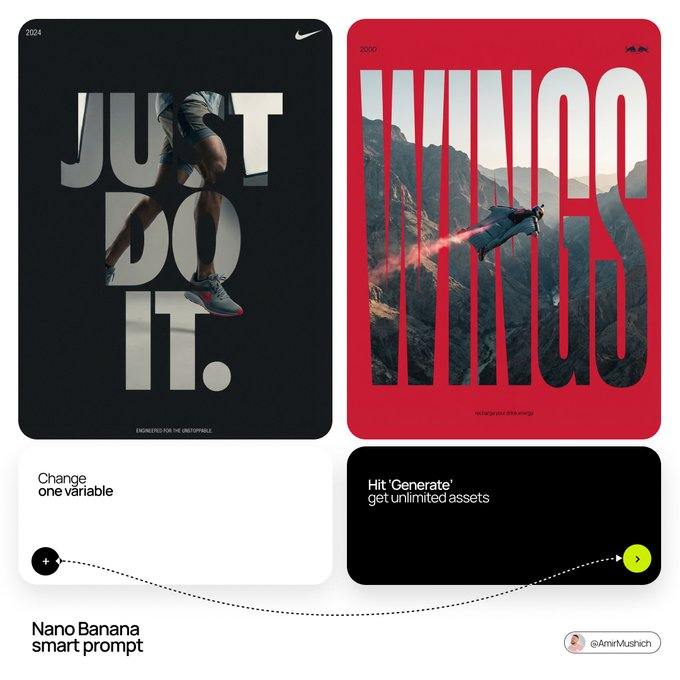
Poster Design
Poster Design Prompt Template
Use Cases
- Suitable for Poster Design AI image generation workflows, with reusable structure for fast iteration.
- Best for product hero shots, packaging proposals, and brand campaign visuals.
Notes
- Replace placeholders (such as
[OBJECT]and{variable}) with concrete subjects and contexts. - Keep core constraints first (composition, lighting, lens, materials), then add style modifiers gradually.
- If results become noisy, reduce prompt density and reintroduce key elements step by step.
#Poster Design
作者@AmirMushich来源链接https://x.com/AmirMushich/status/2045938770906657274
Prompt 模板
[BRAND NAME].
Act as a Senior Editorial Designer and Typographer.
PHASE 1: TYPOGRAPHIC MASK (THE "WINDOW" EFFECT).
- Core Element: Use the most iconic slogan or the name of [BRAND NAME] as a massive, ultra-bold, heavy sans-serif typographic mask.
- Layout: The letters must be giant, filling the entire vertical frame from edge to edge with tight kerning.
- Concept: The text acts as a "cut-out" window. The background is solid white, and the photographic subject is visible ONLY through the letterforms.

PHASE 2: DYNAMIC SUBJECT LOGIC.

- Subject Selection:
- Detail: Ensure a high-contrast element (like a red shoe or a glowing headlight) is visible through one of the letters as a focal point.

PHASE 3: SOPHISTICATED MUTED PALETTE.

- Atmosphere: Use a "Refined Muted" color scheme.
- Tones: Soft slate blues, charcoal greys, and creamy off-whites for the photography inside the mask.
- Accent: Identify one sharp, saturated accent color belonging to [BRAND NAME] and apply it to a single key object visible through the text.

PHASE 4: PHOTOGRAPHY & LIGHTING.

- Lighting: Soft-box studio lighting. Diffused shadows and gentle highlights to create a cinematic, high-end editorial feel.
- Finish: Clean, matte texture with zero visual noise. High-definition photographic quality.

PHASE 5: MINIMALIST BRANDING.
- Accents: Add a tiny minimalist logo and a small vertical tagline in a clean, microscopic sans-serif font near the corners.
- Year: Include the year "2026" in a subtle, elegant font to mimic a limited-edition look.
示例图片