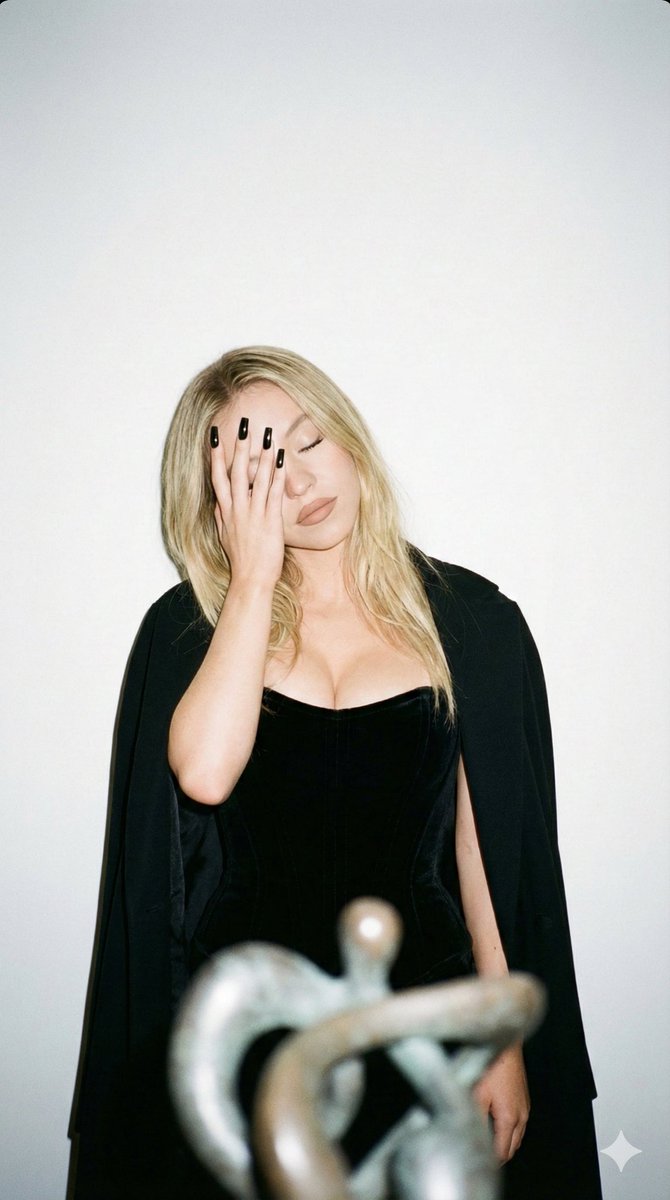
Photography
Photography Prompt Template
Use Cases
- Suitable for Photography AI image generation workflows, with reusable structure for fast iteration.
- Best for stable, style-consistent outputs in iterative generation.
Notes
- Replace placeholders (such as
[OBJECT]and{variable}) with concrete subjects and contexts. - Keep core constraints first (composition, lighting, lens, materials), then add style modifiers gradually.
- If results become noisy, reduce prompt density and reintroduce key elements step by step.
#Photography
Author@TheNewz_816Source URLhttps://x.com/TheNewz_816/status/2012337157617455596
Prompt Template
{
  "image_style": {
    "type": "photorealistic",
    "aesthetic": "Instagram shot",
    "effects": [
      "film grain",
      "direct flash"
    ]
  },
  "composition": {
    "framing": "waist-up photograph",
    "aspect_ratio": "9:16"
  },
  "subject": {
    "description": " woman Sydney Sweeney",
    "constraint_note": "do not alter the sensitivity of the face and features",
    "pose": {
      "orientation": "facing the camera directly",
      "head": "tilted slightly to the side",
      "eyes": "closed",
      "action": "covering her face with her hand, pulling her elbow away and lifting it to the side",
      "mood": [
        "elegant",
        "pensive",
        "playful"
      ]
    },
    "appearance": {
      "attire": [
        "black velvet corset",
        "expensive black cape"
      ],
      "hair": "loose",
      "makeup": {
        "style": "nude",
        "lipstick": "matte nude"
      },
      "details": [
        "décolletage highlighted",
        "long, square black nails"
      ]
    }
  },
  "setting": {
    "background": "white wall",
    "foreground_elements": "art object placed in front of the wall"
  }
}Sample Images